


Trusmora
- Product
- Project management for home builders
- Used by
- Builders, project managers, site superintendents and homeowners
- Type
- Web app with mobile views for the job site and clients
- Built by
- Syncxperts
Project management software for small home builders that keeps every home's budget, schedule, change orders and bank draws in one place.
Trusmora is custom project management software built by Syncxperts for small home builders. It brings budgets, schedules, change orders, bank draws and job site logs into one place for the builder, the site crew and the homeowner, with AI that does the paperwork in between.
Screens use sample data. Kessler Oak Homes, the Patel residence, the subcontractors, the bank and all figures are examples.
A small builder running five or ten homes at once keeps the business in spreadsheets, text threads and paper. Budgets are updated at the end of the month, so overruns show up too late. Change orders get agreed on site and priced later. Every bank draw means hours of collecting invoices, photos and lien waivers. The information exists, but it is spread across too many places for anyone to see the full picture of a home.
One system for every home the builder runs: budgets, schedules, change orders, bank draws, bids and site logs, with AI that turns voice notes, receipts and invoices into the paperwork.
What we built
- 01
Every home on one screen
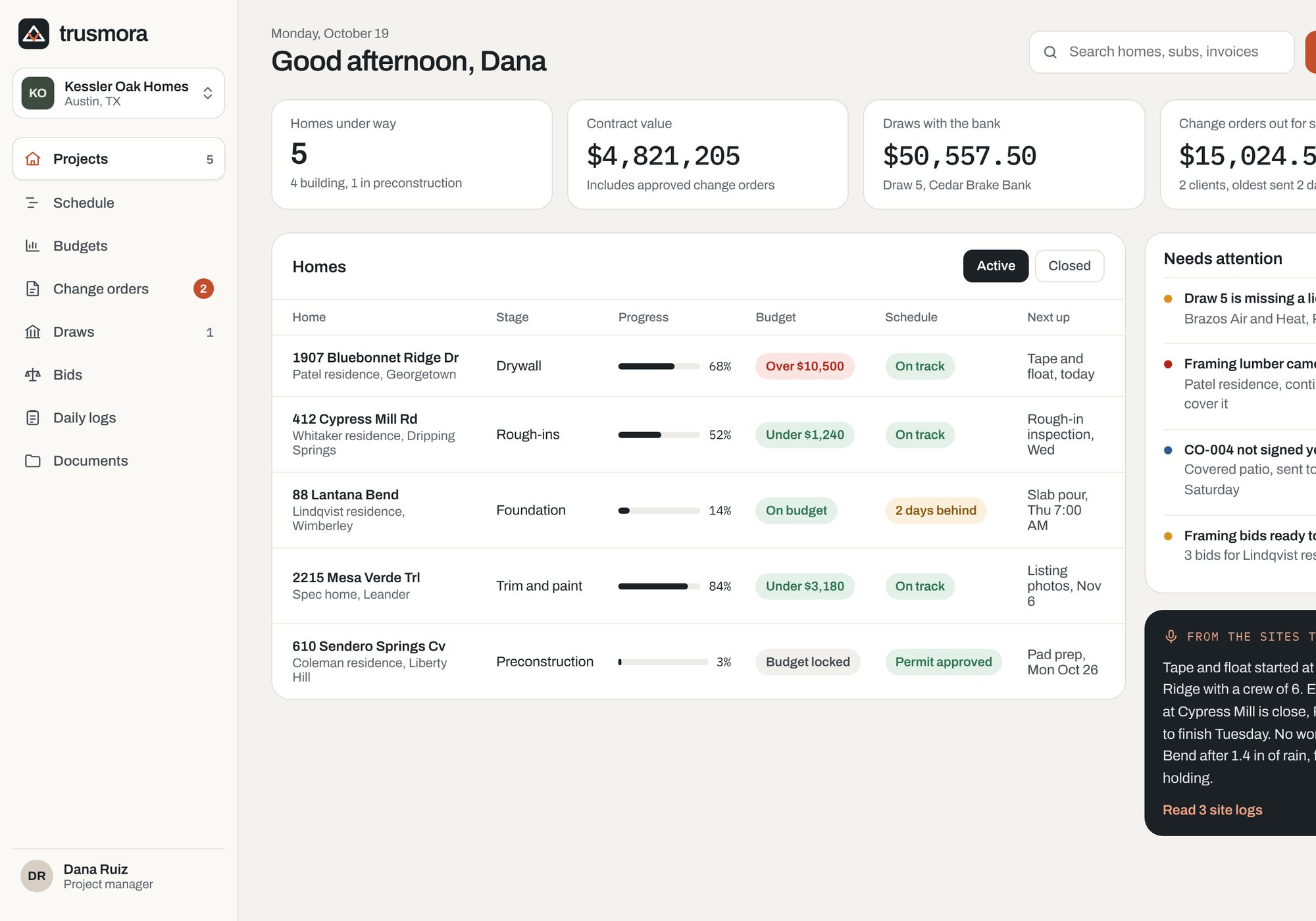
The dashboard shows each home's stage, progress, budget and schedule at a glance, with a short list of what needs attention today and a summary of what happened on every job site.
- 02
Site logs from a voice note
The superintendent records a short voice note at the end of the day. Trusmora turns it into a proper daily log with weather, crew, work done and issues, and adds any problem to the task list.
- 03
Budget vs actual that explains itself
Every cost code shows budget, committed, spent and projected cost. When a home goes over, Trusmora explains why from the invoices and offers to cover it from contingency in one click. Receipts are sorted into the right cost code automatically.
- 04
Change orders priced for you
When the homeowner asks for a change, Trusmora drafts the price from the builder's current subcontractor contracts and material quotes, adds the builder fee and shows the effect on the contract and the move in date.
- 05
Homeowners sign on their phone
The homeowner gets a clear summary of the change, the new contract total and the new move in date, and signs with a finger. The builder sees it signed in seconds.
- 06
A schedule that updates itself
Once a change order is signed, the new work is added to the schedule, the move in date moves and the affected subcontractors get the new dates by text.
- 07
Bank draws ready to send
Trusmora builds each draw request from the schedule, invoices and site logs, applies retainage, and checks off everything the bank asks for, from inspection reports to lien waivers. When the last document arrives, the draw goes to the bank in one click.
- 08
Bid comparison that catches missing scope
Subcontractor bids are compared side by side. Trusmora spots work a bid leaves out, prices it from past homes and shows the real cost of each bid against the budget, along with start dates, track record and insurance.
- 09
Documents you can ask questions
Plans, permits, contracts and selections live with each home. The team can ask a plain question and get the answer with the exact plan sheet it came from, and see site issues pinned on the floor plan.
How it works
- 1
Set up the home
Add the budget, schedule, contract and lender details once.
- 2
Run the site
The crew logs the day by voice and photos, and receipts are added from the phone.
- 3
Handle changes
Price, send and sign change orders without leaving the app.
- 4
Get paid
Draw requests are built from the real progress on site and sent to the bank.
Inside the build
9 screensDesign
Trusmora is designed to feel sturdy and calm, for people who check it in the office and on a muddy job site. The logo is a roof truss: two rafters and a tie beam held together by the webbing inside, the way Trusmora keeps money, time and paperwork connected on every home. The palette is ink and plaster with a brick accent for actions and anything the AI does, plus clear status colors for on track, needs attention and over budget. Archivo is used for the interface and IBM Plex Mono for money, cost codes and dates.
Our role
- Product strategy and workflow design
- UX and UI design for the web app and the mobile job site and homeowner views
- Brand identity and logo
- AI feature design for site logs, budget explanations, change order pricing, draw requests and bid review
- Interactive prototype and product demo video
Need software built around how your business runs?
Syncxperts designs and builds custom software that replaces spreadsheets and scattered tools with one system your team actually uses, with AI where it saves real time.