

Xavqi
- Product
- AI support automation for online stores
- Connects to
- Gmail, Shopify, Recharge, UPS and USPS, Slack, HubSpot
- Type
- SaaS web app with AI workflow steps
- Built by
- Syncxperts
A support inbox autopilot for online stores that reads every customer email, checks the order and answers or hands off with a reply ready.
Xavqi is an AI automation platform built by Syncxperts for ecommerce support teams. It reads every customer email, looks up the order in Shopify, checks tracking, answers the routine questions on its own and prepares everything else for the team, with clear rules on what it may and may not do.
Our own product. Morrow Coffee Co., its customers and the figures on the screens are demo data inside the product, not a client.
Most emails to an online store ask the same few things: where is my order, can I change my subscription, my item arrived damaged. Each one means opening the store admin, finding the order, checking the carrier and writing a reply. Small teams fall behind, replies take hours, and customers write again or ask their bank for a chargeback.
One automation that reads every support email, checks the order and the carrier, answers the routine questions and prepares the rest for the team, with approvals for anything that costs money.
What we built
- 01
Inbox that sorts itself
Every new email is read in seconds, tagged with the reason the customer wrote, and given a clear status: resolved, drafted, waiting for approval or with the team. Each email shows exactly what Xavqi did, step by step.
- 02
Replies customers actually want
For order questions, Xavqi finds the order, reads the live tracking and replies with a real delivery date, often in under a minute.
- 03
Visual workflow builder
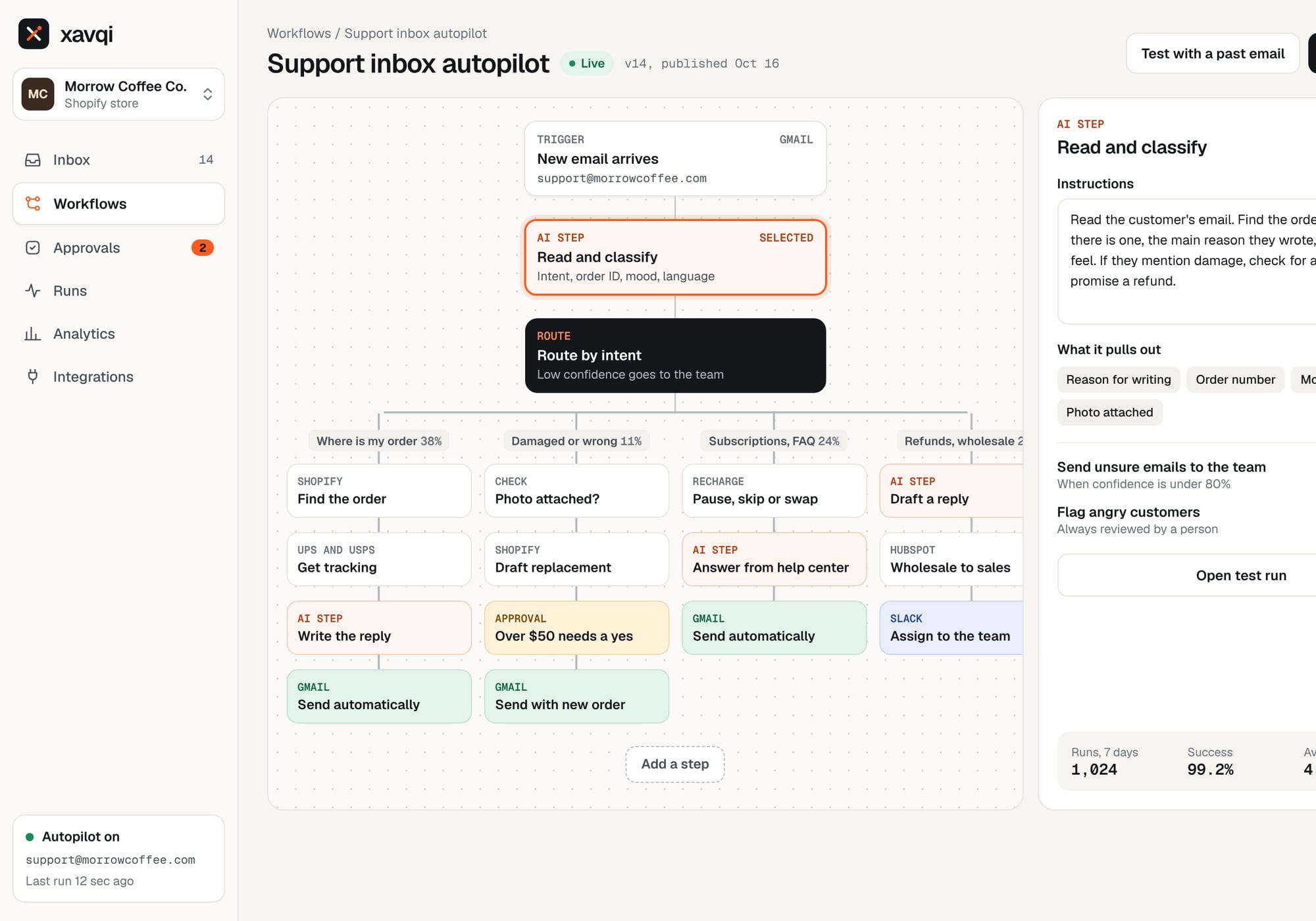
The whole process is one readable flow: a trigger, an AI step that reads and classifies the email, routing by reason, then the actions for each path in Shopify, Recharge, HubSpot, Slack and Gmail.
- 04
AI step you can test
The team can run the AI step on any past email and see what it pulled out, with a confidence score for each field. It is checked against how the team answered past emails, so they can trust it before it goes live.
- 05
Approvals for anything that costs money
Replacements over a set amount, refunds and store credit wait for a person. Xavqi prepares the order, the reply and the reason, and the team approves with one click in the app or in Slack.
- 06
Runs, retries and alerts
Every run is logged with each step and how long it took. When a service like a carrier API does not respond, Xavqi retries, never guesses, and hands the email to the team with an alert in Slack.
- 07
Analytics
The team sees how many emails were handled, how many were resolved without a person, how fast customers got a first reply and how much time was given back, broken down by reason.
- 08
Integrations with clear permissions
Each connected tool has its own permissions. For example, Xavqi can read orders and create replacement orders with approval, but it is blocked from issuing refunds or editing products.
How it works
- 1
Connect
Link the support inbox, the store and the tools the team already uses.
- 2
Set the rules
Decide what Xavqi can do alone, what needs approval and what always goes to a person.
- 3
Test
Run it on past emails and compare with how the team answered.
- 4
Go live
Xavqi handles the routine work and the team focuses on the rest.
Inside the build
8 screensDesign
Xavqi has the look of a focused tool for people who work in it all day. The logo is an X made of two paths: one runs straight through, the other bends off to its own destination, the way every email gets routed where it should go. The palette is graphite and paper with a signal orange for everything the AI does, plus clear status colors for resolved, waiting and handed off. Geist is used for the interface and Geist Mono for order numbers, run IDs and data.
Our role
- Product strategy and workflow design
- UX and UI design for the web app and the customer email
- Brand identity and logo
- AI step design, routing rules, approval rules and failure handling
- Interactive prototype and product demo video

Want to automate the busywork in your team?
Syncxperts designs and builds AI automations that connect your tools, read and sort incoming work, and take repetitive tasks off your team.