
Businesses in ChatGPT: how to claim your business and set up an agent
OpenAI now lets businesses claim a profile in ChatGPT, see how often they are mentioned and publish an AI agent that answers customers. What it does, who can use it, what it costs and the terms to read first.


On 10 November 2026, OpenAI launched Businesses in ChatGPT. For the first time, a business can claim its own profile inside ChatGPT, see how often ChatGPT mentions its website, and publish an AI agent that answers customers' questions there.
On 19 November, OpenAI opened agents to ecommerce and online service businesses outside the US. That makes it relevant for online stores everywhere, including Pakistan. This post covers what it does, who can use it, what it costs and what to check before you sign up.
The short answer
Businesses in ChatGPT has two parts:
- Business Hub. Claim your business, edit its profile and see 28 day insights, such as how often ChatGPT cited your website.
- Business Agents. A chat inside ChatGPT that answers questions about your products and policies, then sends people to your website to buy.
It is a beta and free for now. It is worth claiming if you run an online store or online service, so that what ChatGPT shows about you comes from you. Read the terms first, because your business is responsible for what its agent says.
What Business Hub gives you
Once your claim and identity check are approved, you can edit your profile: website, description, category, logo, cover photo, and delivery and return policies. OpenAI reviews changes before they go live. You can also add a product feed with prices and stock, or connect a Shopify store.
The insights cover the last 28 days:
- Mentions. How often ChatGPT referred to your website in answers. Your brand name alone does not count; your website has to be cited.
- Website clicks. Clicks from ChatGPT through to your site.
- Profile views. How many people opened your profile.
- Discovery topics. Common themes in the answers that mentioned you.
You never see individual questions or conversations, not even chats with your own agent. A blank number may mean you have not reached a minimum, not that the figure is zero.
What a Business Agent can and cannot do
The agent answers questions about your products and policies using your profile, product details and feed. ChatGPT may also use other sources. Each chat is labelled as your business's agent and kept separate from ChatGPT's own answers.
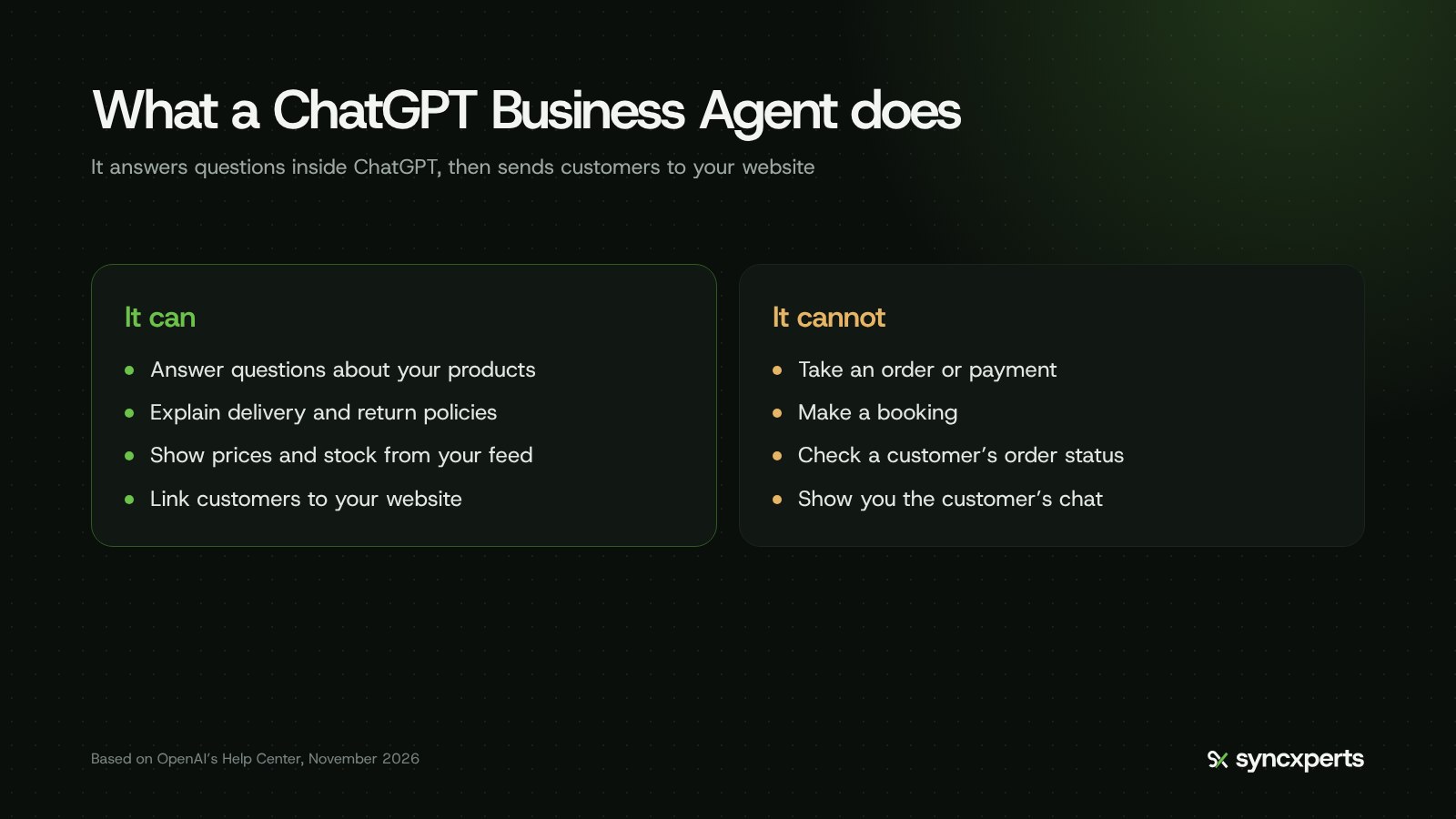
According to OpenAI's Help Center, it cannot complete a purchase, make a booking or check a customer's order. Checkout happens on your own website. You also cannot bring your own agent; OpenAI builds it from your information and instructions.
Early tests show quality depends on your data. In hands-on tests reported by Search Engine Roundtable, Wayfair's agent showed useful product cards from its feed, while Chewy's said it had no live catalogue connected. An agent with a thin profile and no feed gives thin answers.
Who can use it
- Claiming a profile: eligible businesses located where ChatGPT is available.
- Agents: at launch, US ecommerce and online service businesses. Since 19 November, the same types of business outside the US.
- Local shops and restaurants: they can currently claim only an existing US listing, and cannot create agents.
Pakistan is on OpenAI's list of countries where ChatGPT is available, so Pakistani online stores look eligible under OpenAI's wording. No official source names Pakistan, though, and OpenAI's Help Center still described agents as US only when we checked on 28 November. The quickest way to find out is to open Business Hub in your own ChatGPT account.
How to claim your business
Based on OpenAI's Help Center:
- Sign in to ChatGPT and open Business Hub from the sidebar.
- Search for your business. If it is not listed, eligible online businesses may see an option to add it.
- Verify the claim by business phone, business email, a DNS record on your website's domain, or by connecting Shopify.
- Wait for OpenAI's review by email.
- Complete the identity check with Persona. It may ask for a government ID, business registration and proof that you can represent the business.
- Fill in your profile, and add a product feed or connect Shopify if you sell products.
- If you are eligible, create the agent: review its information, write instructions, test it with real customer questions, fix wrong answers, then publish.
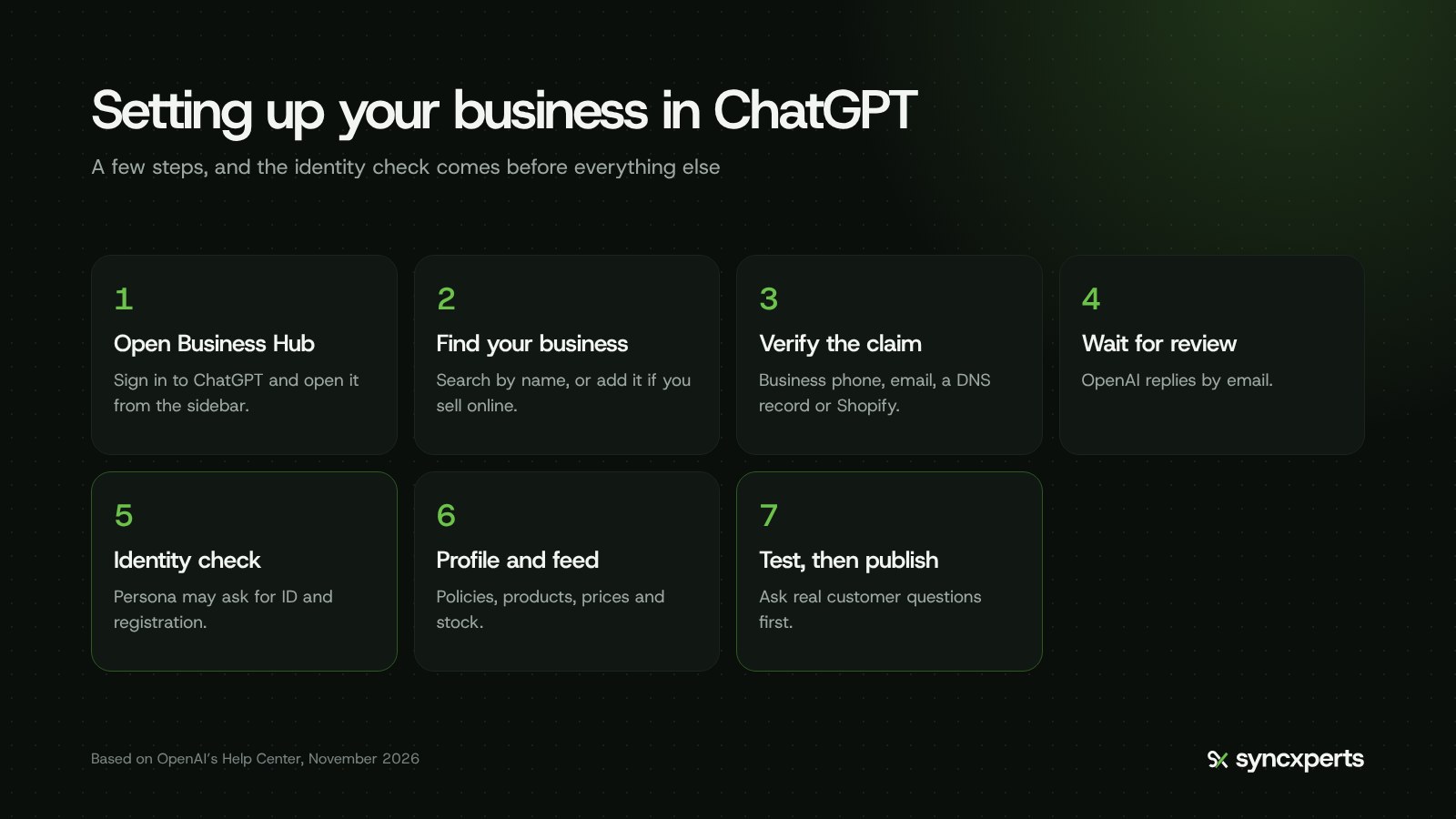
Everything else waits for the identity check. You cannot edit the profile, add a feed, see insights or create an agent until it is approved. Shopify users report problems at this stage: OpenAI's ChatGPT app on the Shopify App Store had a rating of 1.6 out of 5 from 145 reviews on 28 November, many mentioning verification errors.
What it costs
OpenAI's VP of monetization, Benji Shomair, told Digiday the hub and agents are free, and did not rule out charging later. No OpenAI page lists a price, so treat it as free for now.
The paid route is ChatGPT Ads. Businesses can use their agent as the destination for an ad, labelled as sponsored. Sponsored Business Agents are rolling out in Ads Manager, and an agent built in Business Hub does not carry over to Ads Manager.
Read the terms before you publish an agent
These points come from OpenAI's Businesses in ChatGPT terms, updated on 18 November 2026:
- You are responsible for what your agent says, even answers you did not write or review, and OpenAI does not promise the answers are accurate.
- OpenAI gets a licence to the information you add. For basic details such as name, address, phone, hours and website, that licence is permanent.
- OpenAI owns the insight data and keeps the conversations. You see totals and themes only.
OpenAI's agent policy also bans invented prices, stock levels, reviews and guarantees. So the job is simple but important: keep your prices, delivery times and return policy accurate everywhere, and test the agent with the questions your customers actually ask.
How it compares
ChatGPT is not the only platform giving businesses an AI front desk:
| Platform | What the business gets | Can it book or sell? |
|---|---|---|
| ChatGPT Business Agents | Profile, insights and an agent inside ChatGPT | No, it links to your website |
| Meta Business Agent | AI replies on WhatsApp, Messenger and Instagram | Yes, it can book appointments |
| Google Business Profile | AI messaging from Search and Maps | Answers routine questions and hands off to a person |
SEO companies such as BrightLocal call Business Hub ChatGPT's version of Google Business Profile. That is their comparison, not OpenAI's, but the idea is the same: the platform will describe your business anyway, so you want it to describe you correctly.
Should your business set it up?
Claim your profile if you run an online store or online service. It costs nothing now, keeps your details accurate, and the insights show whether ChatGPT is sending you visitors.
Take more care with the agent. Publish it only when your website, policies and product feed are complete and current, and test it properly. A wrong answer about a price or a return is your responsibility.
Fix your website first. Insights count mentions only when ChatGPT cites your website, and the agent draws heavily on it. Clear product pages, real photos, prices, delivery details and a return policy matter more than the profile.
Where we stand
We build websites and online stores, and more of our clients now ask how they appear in ChatGPT, not only on Google. Businesses in ChatGPT is the first official way to see that and to manage it. It is early, it is in beta, and it works best for businesses whose own website is already clear and accurate.
If you want help getting your store ready for AI search, from product pages to feeds and policies, book a 30 minute call.
Sources
- Introducing Businesses in ChatGPT, OpenAI, 10 November 2026, updated 19 November 2026
- Setting up your business on ChatGPT, OpenAI Help Center
- Businesses in ChatGPT, OpenAI
- Business Agents Policy, OpenAI, 10 November 2026
- Businesses in ChatGPT Terms, OpenAI, 18 November 2026
- Supported countries, OpenAI Help Center
- Submit product feeds, OpenAI developers
- OpenAI's new business agents, Digiday, 10 November 2026
- OpenAI gives businesses new tools to reach ChatGPT users, PYMNTS, 10 November 2026
- OpenAI lets you claim your business in ChatGPT, VentureBeat, 10 November 2026
- ChatGPT business agents tested, Search Engine Roundtable, 16 November 2026
- ChatGPT Business Hub, BrightLocal, 11 November 2026
- Sponsored Business Agents, The Keyword, 27 November 2026
- ChatGPT app, Shopify App Store
- Google Business Profiles AI powered messaging, Search Engine Roundtable, 29 October 2026
Questions owners are asking
It is a beta from OpenAI, launched on 10 November 2026. Business Hub lets a business claim its profile in ChatGPT, edit its details and see insights. Business Agents let eligible businesses publish an AI chat that answers customer questions inside ChatGPT.
Possibly, but it is not confirmed. Claiming is open to eligible businesses where ChatGPT is available, and Pakistan is on OpenAI's list of supported countries. On 19 November OpenAI opened agents to ecommerce and online service businesses outside the US, but it named no countries. Check Business Hub in your own account.
For now. OpenAI's VP of monetization told Digiday it is free and did not rule out a paid model later. No OpenAI page lists a price. The paid option is ChatGPT Ads, where a business can sponsor its agent.
No. According to OpenAI's Help Center, agents answer questions about products and policies and link customers to your website. They cannot complete purchases, make bookings or check an order's status.
OpenAI says claiming a profile or advertising does not change ChatGPT's own answers. Treat the profile as a way to keep your details accurate and to see insights, not as a ranking boost.
No. Businesses never see individual prompts or conversations, including chats with their own agent. Business Hub shows only 28 day totals and common themes.

Founder and CEO of Syncxperts. Builds AI agents, automation, websites and custom software for growing businesses.