
PHP2Shell: what business website owners need to do right now
PHP2Shell lets attackers take over PHP websites, including WordPress, without logging in. How to check your site and what to fix today, in plain words.

On October 21, PHP released an emergency update for two flaws that let an attacker take over a website without logging in. Government sites in Europe went offline to patch. The Internet Archive shut down for a while. If your business website runs on WordPress, there is a good chance it runs on PHP too.
This post is for owners, not developers. You will find out in about 10 minutes whether your site is at risk, and what to ask your host or developer to do today.
The short answer
If your website runs on PHP, which includes almost every WordPress site, PHP on your server must be updated to one of these versions or newer: 8.2.35, 8.3.36, 8.4.27 or 8.5.12. If you are on PHP 8.1 or older, you need to move to a supported version. Ask your host to confirm in writing that this is done.
If your site runs on Shopify, Wix or Squarespace, you do not run PHP yourself, and there is nothing on your side to update. Sites built with frameworks like Next.js don't use PHP at all.
What PHP2Shell is
PHP is the language that runs a huge part of the web. According to Wiz, one of the teams that found the problem, about 70% of websites use it, including WordPress, Drupal and Joomla.
PHP2Shell is the name for two flaws inside PHP itself, tracked as CVE-2026-109618 and CVE-2026-109619. PHP's developers rated them 9.2 out of 10 for severity. The security firm watchTowr rated them a full 10.
Three things make this one serious:
- No login needed. The researchers took over test copies of WordPress, Drupal and Joomla without any account.
- Your own code being secure doesn't help. The bug is in PHP, not in your theme or plugins. The researchers say even a simple "Hello World" page on an affected PHP version is exposed.
- It can leak secrets quietly. One of the flaws can read the server's memory, which may hold passwords, login tokens and API keys. That kind of theft can happen without the attacker running any code, so it can leave very few traces.
Why so many sites went offline
News of the flaws leaked on October 20, a day before the fix was ready. PHP announced an emergency release, and the patched versions came out on October 21.
Attackers did not wait. Amazon's threat team found an exploit attempt dated October 17, four days before the public announcement. watchTowr said it saw attacks on its test servers by October 21. One security firm, Sansec, expected mass attacks within 15 minutes of the patch going out, because attackers can compare the old and new code to see what was fixed.
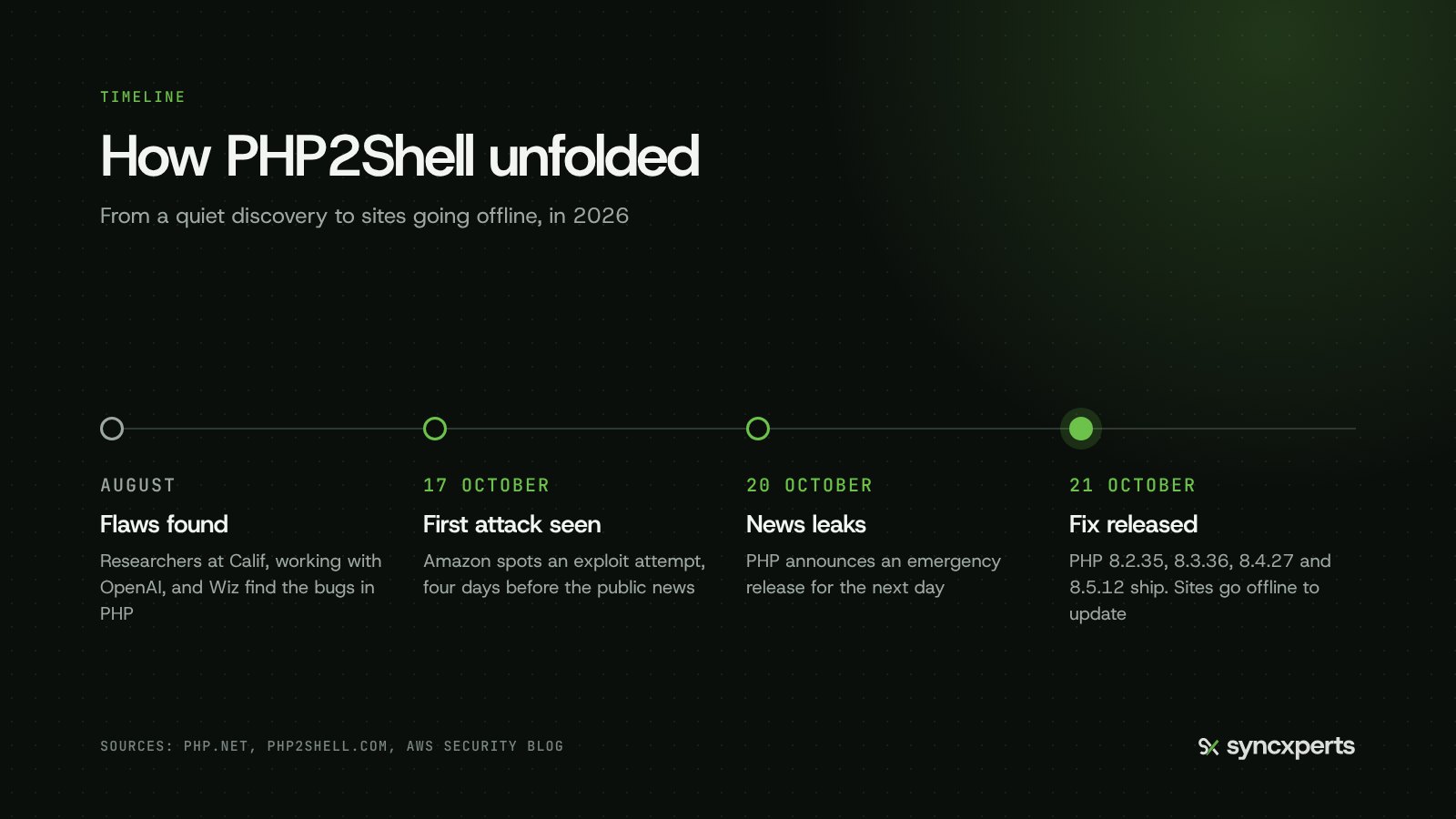
That is why the US National Security Agency told organizations to take sites offline if they could not update right away, and why so many did.
Is your website affected?
Find your setup below.
| Your website runs on | Runs PHP? | What to do |
|---|---|---|
| WordPress or WooCommerce | Yes | Update PHP now, or confirm your host has done it |
| Drupal, Joomla, Moodle or Nextcloud | Yes | Update PHP now |
| Laravel, Symfony or another custom PHP app | Yes | Update PHP and restart the PHP services |
| Shopify, Wix or Squarespace | Not on your side | Nothing for you to update |
| Next.js, a static site or another non PHP stack | No | Not affected by this flaw |
PHP is also bundled inside hosting control panels such as cPanel and Plesk. If you run your own server with one of these, the panel's PHP needs the update too.
How to check your PHP version
You have three easy ways.
- In WordPress: go to Tools, then Site Health, then the Info tab. Open the Server section. Your PHP version is listed there.
- In your hosting panel: in cPanel, look for "Select PHP Version" or "MultiPHP Manager". Other hosts show it on the main dashboard.
- Ask your host. Send them one line: "Is PHP on my account updated for PHP2Shell, and which version is it on now?"
Then compare your version with this table from the official PHP advisory.
| If you are on | You are safe from | Otherwise |
|---|---|---|
| PHP 8.5 | 8.5.12 | Update |
| PHP 8.4 | 8.4.27 | Update |
| PHP 8.3 | 8.3.36 | Update |
| PHP 8.2 | 8.2.35 | Update |
| PHP 8.1 or older | No official fix | Move to a supported version |
The affected releases go back as far as PHP 5.4 from 2012. Running an old version makes your site more exposed.
What to do today
- Update PHP, or get your host to do it. This is the only complete fix. Updating WordPress or your plugins does not update the PHP underneath them.
- Make sure the services were restarted. After the update, Apache, PHP-FPM and any other PHP workers have to restart, or the old code keeps running. A good host does this as part of the update. If you manage your own server, do it yourself.
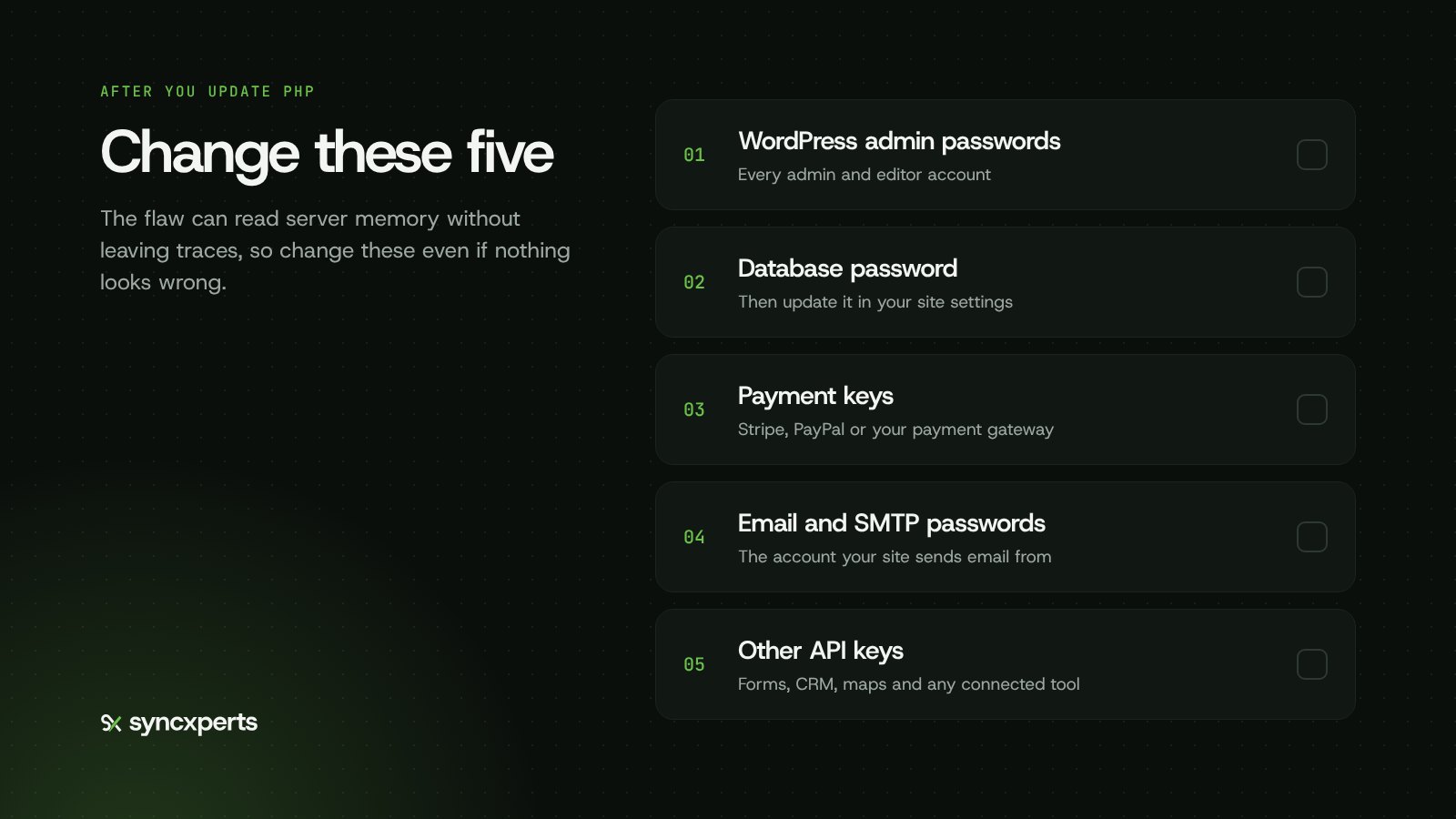
- Change your important passwords and keys. Because the flaw can read memory without leaving traces, we recommend this even if nothing looks wrong: your WordPress admin passwords, your database password, and any API keys your site uses, such as for payments, email or forms.
- Ask for a log check. Your host or developer can look for signs the researchers list: repeated "500" server errors, PHP workers crashing or restarting, and unusual requests followed by memory errors. These signs don't prove an attack, and no signs don't prove you are safe, so steps 1 to 3 still matter most.
- Take a fresh backup after the update and keep a copy outside your hosting account.
If your site uses a security service or firewall like Cloudflare, it may block some attacks for now. The researchers are clear that this does not replace the PHP update.
If you can't update right away
Sometimes an old plugin or theme breaks on a newer PHP version, which leaves owners stuck on an old one. If that is you, treat it as urgent anyway.
- Ask your host whether they have a temporary protection rule for PHP2Shell turned on for your account.
- Consider taking the site offline until it is updated, as the NSA advised.
- Get a developer to fix or replace the plugin that blocks the update. That is usually a much smaller job than rebuilding the site.
The bigger lesson
PHP2Shell was found with help from AI models, and that is going to keep happening. Bugs that sat unnoticed for years can now be found much faster, by researchers and by attackers. For a small business, the practical lesson is simple: know what your website runs on, who updates it, and how fast they respond when something like this happens.
Our own site runs on Next.js and doesn't use PHP, so this one passed us by. We got lucky there. The next big flaw could be in something we do use, and the plan would be the same: know your stack, patch fast, change your keys.
If you are not sure what your site runs on, or your host has gone quiet, book a 30 minute call and we will go through it with you.
Sources
- PHP security advisory, 21 October 2026
- PHP2Shell research site by Wiz, OpenAI and Calif
- PHP2Shell on Wikipedia, with links to coverage from Reuters, BBC, BleepingComputer and others
Questions owners are asking
WordPress runs on PHP, so yes, until PHP on your server is updated. Your host may have patched it already, but don't assume. Check the version yourself or get the answer from your host in writing.
Usually not. The risk is old plugins and themes that were never updated for newer PHP versions. Take a backup first, update, then click through your main pages, your checkout and your contact form.
No. WordPress and PHP are separate. WordPress is the software your site is built with. PHP is the language your server uses to run it. This flaw is in PHP, so PHP itself must be updated.
You may not be able to tell, which is why the advice is to update and change passwords either way. Also look for admin users you did not create, files you don't recognise in your hosting file manager, and pages that send visitors to other websites. If you find any of these, restore a clean backup and change every password.

Founder and CEO of Syncxperts. Builds AI agents, automation, websites and custom software for growing businesses.